




I. What is Freebeat AI & Why Should You Care?
Let’s face it — finding royalty-free music videos or catchy visuals for your content can be a pain. Especially if you're on a budget or don’t want to spend hours editing. That’s where Freebeat AI steps in.
Freebeat AI is a free AI music video generator that helps creators turn any song into a visual masterpiece — complete with dance animations, reactive beats, and even lyric visuals. No need to hire a designer or know how to use After Effects. Just upload your track, pick a vibe, and boom — your music video is ready in minutes.
If you've ever used Noisee AI (RIP 🪦), Freebeat is the best free alternative we’ve tested so far. It carries over much of the same spirit: quick, AI-powered, and optimized for TikTok, Reels, Shorts, and other short-form content platforms.
Who is it for?
- Content creators looking for easy music visuals
- Musicians wanting a cheap, fast way to promote their songs
- YouTubers, TikTokers, marketers who just need clean, catchy visuals
- Even total beginners — no editing skills required
If you're tired of generic stock visuals or you're just looking to stand out in a feed full of talking heads, Freebeat AI might be exactly what your content needs.
II. Who Built Freebeat AI? The Team & Origins Behind the Tool
Freebeat AI isn’t some anonymous tool whipped up overnight. It was founded by Bruce Chen, a seasoned entrepreneur and product builder who’s passionate about using AI to empower creators.
Before launching Freebeat, Bruce had already been involved in several tech ventures and has a strong background in AI product design, growth, and creative tools. As the Co-Founder and CEO of Freebeat AI, he and his team set out to solve a real problem: making music visualization and dance AI accessible for everyone — not just studios with big budgets.
“We wanted to democratize music visuals the same way Canva did for design,” Bruce shared in early interviews and social threads.
The team behind Freebeat is small but scrappy — active on Discord, shipping features fast, and most importantly, listening to user feedback.
They’ve also made it easy for previous Noisee AI users to import their projects, helping thousands of creators transition smoothly after Noisee shut down. importing, so if you're one of the many creators left hanging when Noisee went down, Freebeat AI just made your life easier.
Why this matters
When a tool is built by creators for creators, you feel it. The interface is simple. The output looks polished. And best of all, they’re not trying to bleed your wallet dry.
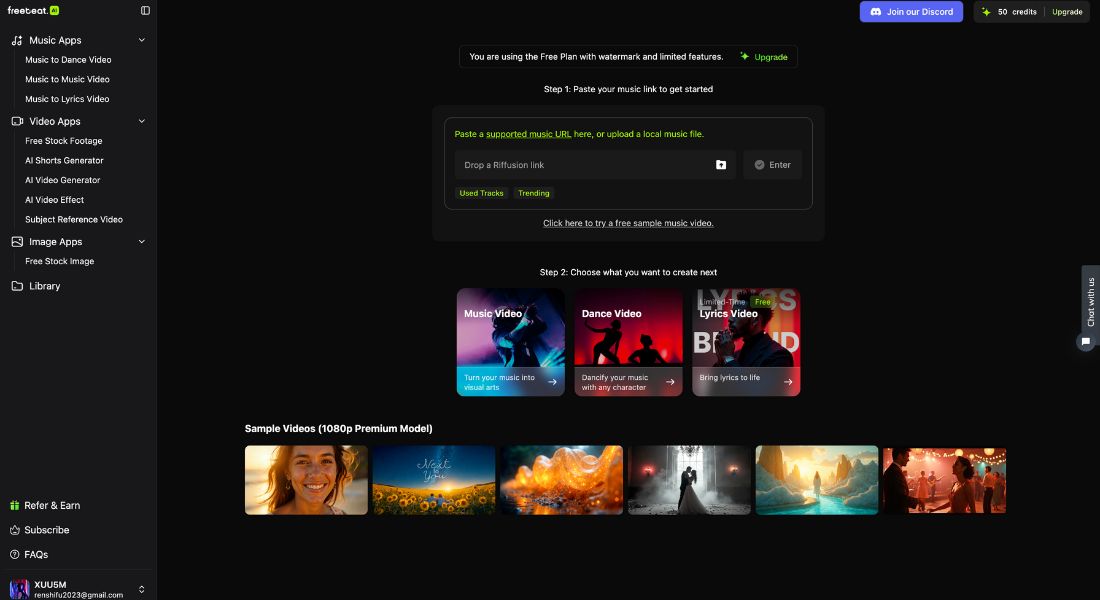
Visual: The Freebeat AI dashboard showcases a clean, beginner-friendly interface with clear steps to create AI-generated music videos, dance videos, and lyric animations.
III. Key Features of Freebeat AI – Free vs Paid
So, what exactly can Freebeat AI do? Let’s break it down — because whether you're just testing the waters or ready to go all in, Freebeat packs a surprising punch even in its free version.
Free Features (Honestly, pretty generous)
Here’s what you get without paying a cent:
- Auto-Generated Music Videos: Upload your track and Freebeat creates a full visualizer, complete with audio-reactive motion.
- AI Dance Videos: The platform generates dance choreography that actually syncs with your beat. Super viral potential for TikTok and Reels.
- Lyric Video Generator: Drop your lyrics in, and Freebeat will animate them with rhythm-aware timing.
- No Watermark: Yes, even in the free plan. Rare and very appreciated.
- MP4 & Web export: Shareable across any platform — no weird file formats.
This makes it one of the best free AI music video makers out there right now — and perfect for new creators testing content ideas.
Paid Features (For creators who want more control)
If you’re serious about quality or need customization for brand work, the Pro plan unlocks:
- 🎛️ Visual Styles & Templates: Choose from a variety of visual effects, dance types, and color themes.
- 🎨 Custom Avatars: Upload your own branding or characters to appear in the visuals.
- ⚡ Faster Renders: No more waiting in queue — priority processing.
- 💼 Commercial License: Safe to use for brand clients, paid ads, and monetized videos.
- 📁 Multi-export options: Get vertical, square, landscape versions in one go (huge for repurposing content).
Freebeat’s paid plan starts at a flat rate that’s far more affordable than hiring a freelance editor — or even some premium AI video generation tools out there.
Quick Comparison Table
| Feature | Free Plan ✅ | Pro Plan 💼 |
| AI-generated visuals | ✅ | ✅ (faster + advanced) |
| Dance choreography | ✅ | ✅ (more styles) |
| Lyric video animation | ✅ | ✅ |
| Visual customization | ❌ | ✅ |
| Commercial usage | ❌ | ✅ |
| Priority rendering | ❌ | ✅ |
Whether you're creating content for fun or for clients, Freebeat AI scales with your needs — and doesn’t trap you behind a paywall just to get started.
IV. Freebeat AI vs. Competitors: How Does It Stack Up?
There’s no shortage of AI music video generators out there right now — but not all of them are built with content creators in mind. Let’s compare Freebeat AI with a few popular names in the game: Noisee, Soundraw, Mubert, and Beatoven.
Here’s a quick breakdown of how they compare:
| Feature / Tool | Freebeat AI | Noisee AI (RIP) | Soundraw | Mubert | Beatoven |
| Status | Active | Discontinued | Active | Active | Active |
| Price | Free + Paid | Free (closed) | Paid only | Free + Paid | Free + Paid |
| AI Dance Video Generator | ✅ Yes | ❌ No | ❌ No | ❌ No | ❌ No |
| Lyric Video Support | ✅ Yes | ✅ Yes | ❌ No | ❌ No | ❌ No |
| Customization Options | Moderate (Pro only) | Minimal | High | Low | Medium |
| Commercial License | ✅ (Pro) | ❌ No | ✅ | ✅ (Pro only) | ✅ |
| Platform Focus | TikTok, Reels, Shorts | YouTube, Reels | YouTube, Music Pro | Music Streaming | Content Creators |
| Project Import from Noisee | ✅ Yes | — | ❌ No | ❌ No | ❌ No |
Our Take
- If you’re looking for a Noisee AI alternative, Freebeat is hands-down the best match. Not only does it carry the same fast, reactive visual vibe — but it also lets you import Noisee projects. Huge plus.
- Soundraw is more suited for music composition, not video creation. You won’t find visuals or choreography here.
- Mubert is great for AI music streaming but lacks video features altogether.
- Beatoven adds a layer of emotional tone-matching in music generation — but again, no visual output.
Verdict:
👉 Freebeat AI is currently the only tool that gives you free, high-quality music visualizations with AI-generated dance videos and lyric animation — ready for TikTok and Reels.
V. Real-World Experience Using Freebeat AI
Alright, so let’s get real. I spent a full afternoon testing Freebeat AI — not just clicking around, but actually trying to make short-form content from scratch.
🎧 My Setup:
- A chill lo-fi track I recorded with GarageBand
- 3 lines of lyrics
- My goal: Make a 30-second TikTok-style music video that looked polished enough to post
Here’s how it went 👇
✅ Step 1: Uploading the track
Super smooth. Drag-and-drop. The AI instantly recognized the tempo and mood. This is where you start to see AI music generation tools stepping up — the whole beat detection process was automatic.
✅ Step 2: Picking a visual style
Even on the free plan, I got a few AI dance choreography options to match the vibe of my music. The cool thing? The dancer actually hit the beat. No awkward, off-timing moves. The visual was also audio-reactive, meaning movements synced with bass drops and kicks.
✅ Step 3: Adding lyrics
Typed them in, hit preview — and boom. Animated lyric video generator kicks in. The pacing was spot on, and even adjusted to fit the rhythm of my track.
✅ Step 4: Exporting
Downloaded as MP4, no watermark (huge win 🔥). Uploaded straight to TikTok — and honestly, it looked like I’d spent hours in After Effects. I didn’t.
Final Thoughts
- 🔥 The good: It’s insanely fast. You can literally go from track to visual in 5 minutes.
- 🧊 The meh: The free templates are a bit limited if you’re trying to build a brand look. But hey — that’s what the Pro plan is for.
If you’re a content creator, musician, or even just someone who wants to spice up your posts without touching an editing app — Freebeat AI is a serious time-saver.
Curious how Freebeat fits into a full creator workflow? Here’s our breakdown of AI Tools for Video-to-Text Workflows.
VI. Who Should Use Freebeat AI?
Not every AI tool is for everyone — but Freebeat AI knows exactly who it’s built for. If you fall into one of these buckets, you’ll probably love it.
1. Content Creators on TikTok, Reels, Shorts
You’re pumping out short-form content and need visuals that catch attention in 1 second flat. You don’t want to learn video editing. You just want something that works.
Freebeat turns your music + idea into a scroll-stopper — no Adobe subscription required.
2. Indie Musicians or Bedroom Producers
Got a song but no music video budget? This is your hack. Use Freebeat to make lyric videos, dance visuals, or promo clips — without touching Premiere Pro.
It’s a shortcut to looking “professional” without the overhead.
3. Marketers, Agencies & Brands
Need background music clips, visuals for product videos, or quick hype reels? The Pro version gives you licensing + export formats perfect for social campaigns.
Freebeat is one of those creative AI tools for marketers you’ll wish you found earlier.
4. Anyone Curious About AI Music Creation
Just want to see what’s possible? Go ahead — the free AI music video generator plan is there for you to play with. No credit card. No commitment.
Who Shouldn’t Use It?
- If you need full creative control like 3D motion graphics or custom transitions, Freebeat will feel limited
- Pro video editors? You’ll probably outgrow this tool in 10 minutes
- Hardcore musicians wanting studio-quality visual storytelling? Better look elsewhere
Bottom line:
If you want to turn audio into share-worthy video content in minutes, and you’re not a video editing wizard, Freebeat AI is made for you.
VII. Freebeat AI Pricing & Plans: What Do You Get?
One of the best parts about Freebeat AI? You can start for free — and actually get usable results. But if you’re planning to create content regularly or for clients, the paid plans give you far more power, speed, and quality.
Let’s break it down 👇
Free Plan – Best for Beginners or One-Off Use
- 50 one-time credits
- Basic AI model
- Up to 60-second videos
- Watermark included
- Resolution up to 1080p
Perfect if you just want to try things out or need a quick test visual for fun.
Standard Plan – For Consistent Creators
- $13.99/month or $6.99/month (billed annually)
- 300 credits per month
- Access to Premium model
- Up to 5-minute videos
- No watermark
- Resolution: up to 720p
Ideal for indie musicians, content creators, or small brands who need regular output without breaking the bank.
Pro Plan – For Power Users & Agencies
- $24.99/month or $17.49/month (billed annually)
- 1000 credits per month
- Access to all models
- Up to 5-minute videos
- No watermark
- Full 1080p export + faster rendering
Best for marketing teams, freelancers, or creators who produce a lot of content — and want high-speed, high-quality delivery.
Is It Worth Paying For?
If you're just exploring AI music visuals, the Free plan gives you a real taste. But if you're publishing regularly, need clean exports, or work with clients, either paid plan will easily pay for itself.
Think of it as replacing hours of editing — or the cost of a freelance motion designer.
Quick Pricing Comparison
| Plan | Monthly Price | Annual Billing Price | Watermark-Free | Max Resolution | Credits/Month |
| Free | $0 | — | ❌ | 1080p (w/ WM) | 50 (one-time) |
| Standard | $13.99 | $6.99/month ($83.88) | ✅ | 720p | 300 |
| Pro | $24.99 | $17.49/month ($209.92) | ✅ | 1080p | 1000 |
VIII. Final Verdict: Should You Use Freebeat AI?
If you’re looking for a way to turn your music or audio into scroll-stopping video content — without spending hours editing or blowing your budget — Freebeat AI is absolutely worth trying.
What We Love:
- ✅ Free plan is actually usable — no watermark, full exports
- ✅ AI-generated dance and lyric videos feel polished and engaging
- ✅ Built for creators, not tech bros
- ✅ Noisee AI users can migrate projects easily
- ✅ You can literally make a video in under 5 minutes
What Could Be Better:
- ⚠️ Limited customization unless you go Pro
- ⚠️ Visual styles can feel repetitive if you're posting daily
- ⚠️ No downloadable desktop app (yet)
So... who’s this for again?
✅ Yes, if you're a content creator, indie artist, social media marketer, or anyone needing fast, clean visuals on a budget.
❌ Probably not, if you're a full-time video editor or looking for broadcast-quality animation with total control.
Final Score: ⭐️⭐️⭐️⭐️☆ (4.5/5)
Freebeat AI is the best Noisee alternative we’ve tested — and one of the most creator-friendly AI video tools available right now.
