



Introduction: Can AI Actually Make Better Slides?
Creating slides can feel like a chore. You spend hours designing, editing, and trying to make everything look professional. Even with templates, the process is often slow and repetitive.
But things are starting to change. AI presentation tools are stepping in to help. These tools promise faster content, better visuals, and less manual work.
One tool leading this shift is Twistly.ai.
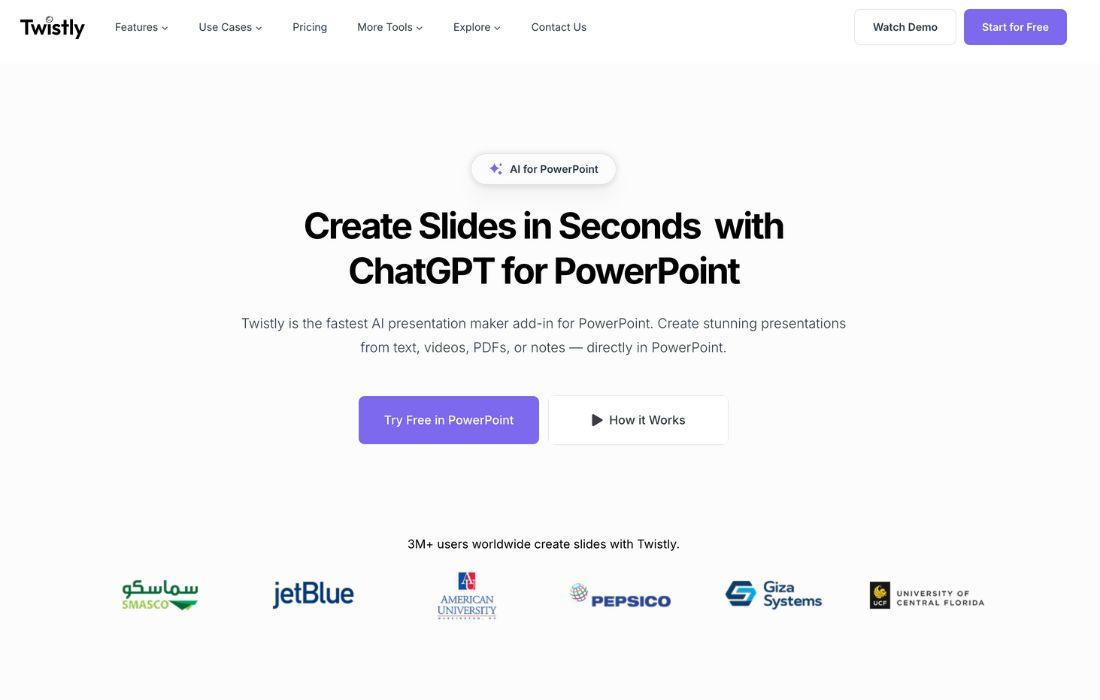
Twistly claims to turn your written notes, YouTube videos, PDFs, and voice inputs into clean, ready-to-present slides. It works directly inside PowerPoint and aims to cut presentation time by more than 80%, according to its creators.
That’s a bold claim.
And with more than 3 million users worldwide, Twistly is clearly making waves. But does it actually deliver high-quality results? Or does it just create more work to fix?
In this review, we take a close look at what Twistly.ai really offers. We tested it with real examples to see how well it handles layout, content, speed, and visual design.
If you’re tired of wasting hours on slide decks, this might be the AI tool you've been waiting for. Let’s dive in and find out.
What Is Twistly.ai and What It Promises
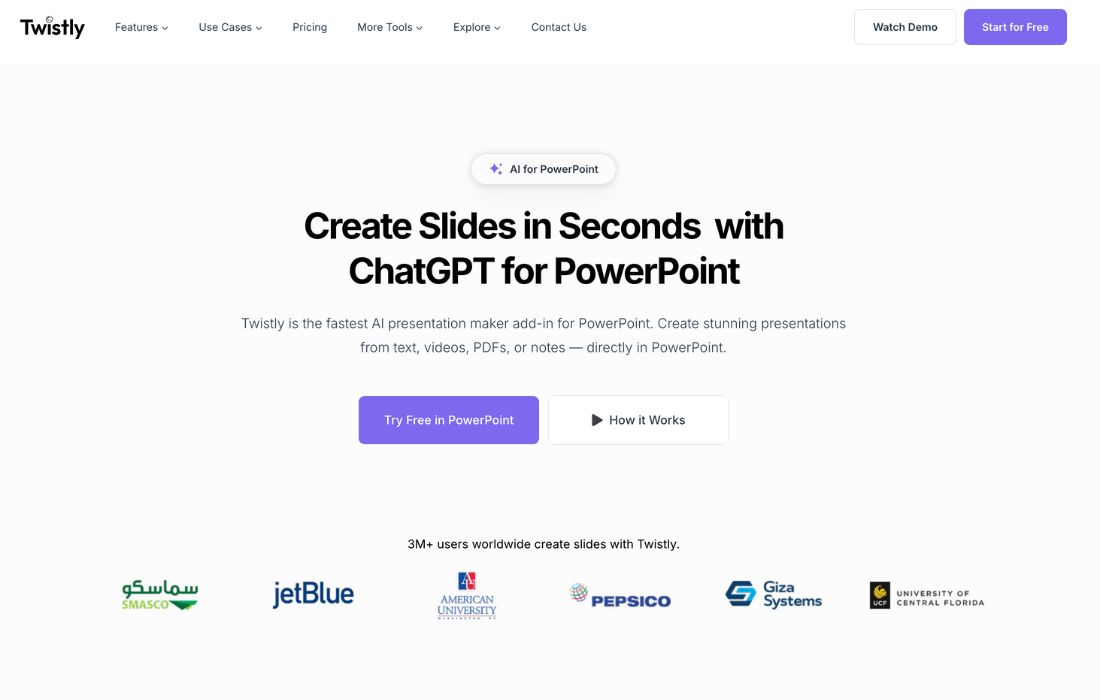
Twistly.ai is an AI-powered presentation assistant designed to make slide creation faster and easier. It works as an add-in inside PowerPoint, which means you do not need to switch tools or learn a new platform.
Its main goal is simple: turn raw content into presentation-ready slides. You can use almost any kind of input — text, video, PDF, web links, or even voice notes. Twistly then uses AI to analyze that content and build a clean, structured slide deck in minutes.
So, what does Twistly promise?
- To reduce your slide-making time by up to 80%
- To help non-designers create professional-looking presentations
- To turn videos into slides, automatically highlighting key moments
- To give you full control inside PowerPoint, without needing to export or reformat anything
It is built for marketers, educators, consultants, and anyone who creates content regularly. If you have ideas or content but no time to format slides, Twistly steps in to do the heavy lifting.
Next, we’ll look at how we tested it — and what we found.
How We Tested Twistly.ai (Verified + Hands-On)
To give you a well-rounded review, we combined official product claims with real-world testing. This helped us see what Twistly.ai delivers — and where it might still need work.
What Twistly Claims
We reviewed Twistly’s official product pages and trusted review sites. Here’s what the tool promises:
- Over 3 million users are currently using Twistly.ai worldwide
- It works with multiple input types:
- Text, YouTube videos, PDFs, Word docs, and even voice notes
- It integrates directly inside Microsoft PowerPoint, so you don’t need to use a new platform
- It includes helpful features like:
- Speaker notes, image suggestions, and even translations
These features gave us a clear baseline. From there, we ran our own tests to see how it works in real scenarios.
What We Tested Ourselves (Hands-On Use)
To check how well Twistly performs, we ran several common tasks:
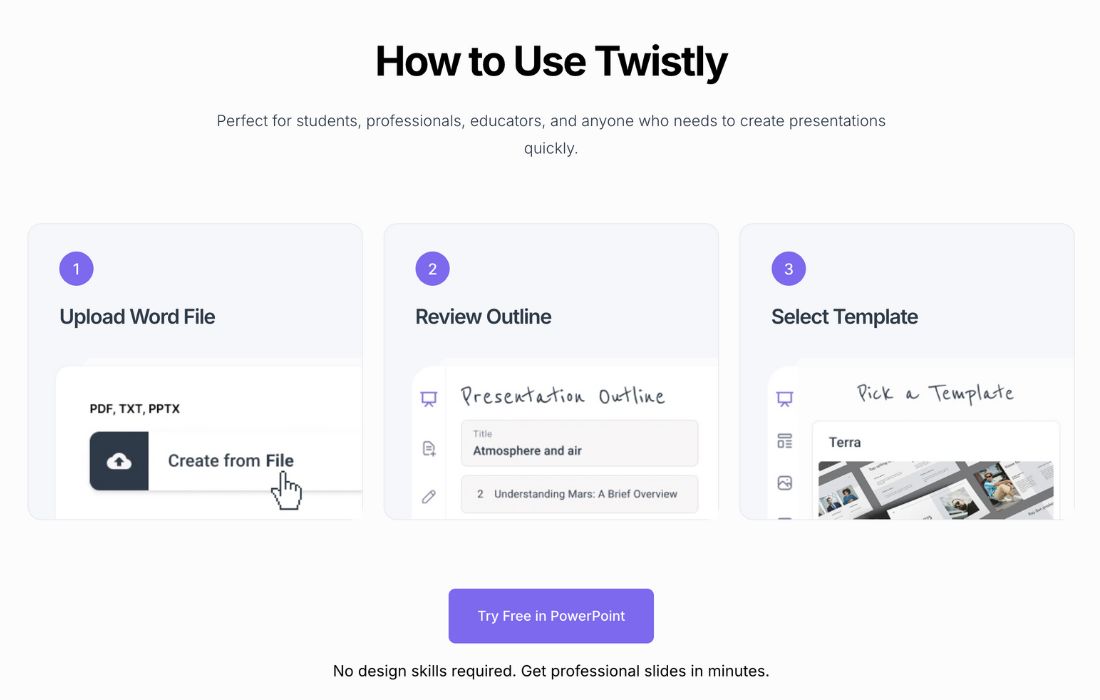
1. Text to Slides
We took a 700-word blog post and converted it into a slide deck.
We looked at how the tool organized content, structured the slides, and matched visuals.
2. YouTube Video to Slides
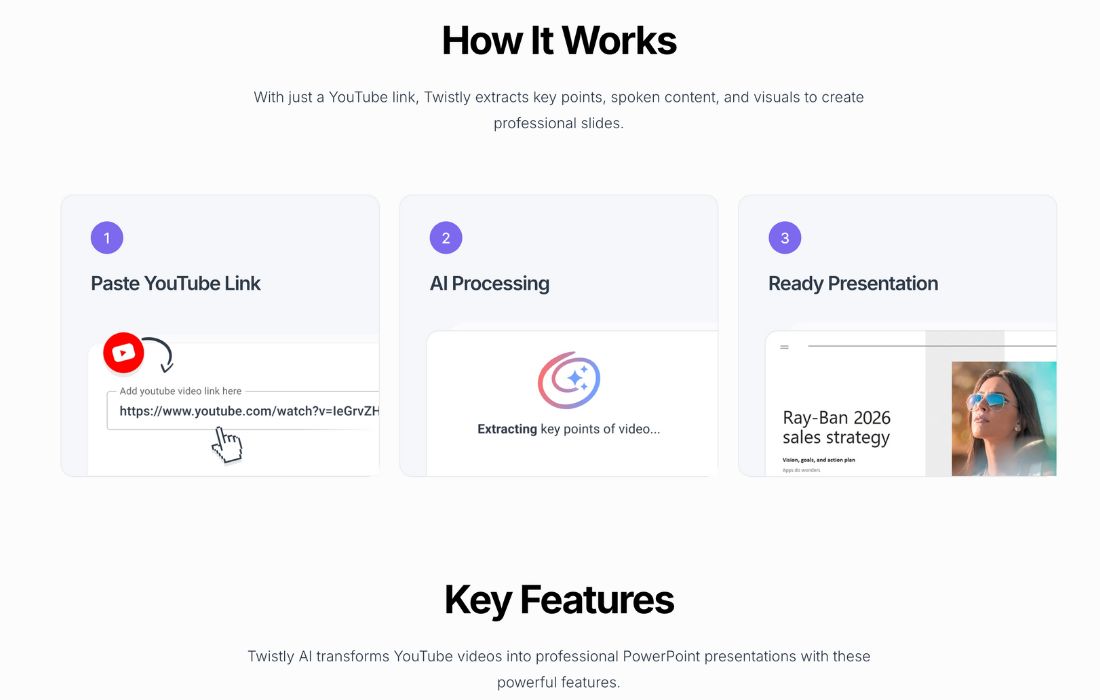
We used a 6-minute educational video on AI basics.
Twistly extracted key moments, created speaker notes, and generated matching visuals.
3. Prompt-Based Slides
We gave Twistly a simple topic: "How AI is Changing Education."
It created a 10-slide deck with intro, key points, and a summary — all structured logically.
Why This Matters
Many reviews only repeat what the product page says. But we wanted to test the experience ourselves — and compare it with what Twistly advertises.
This mix of verified data and hands-on tests helps us answer one key question:
Can Twistly.ai actually make better slides — or just faster ones?
Keep reading. The results might surprise you.
Feature Performance: What Twistly.ai Does Well (and Where It Struggles)
We put Twistly’s key features to the test — based on both verified capabilities and real-world usage. Here’s how it performed in each area.
1. Text to Slides: Fast and Surprisingly Accurate
We gave Twistly a 700-word blog post. Within 30 seconds, it returned a complete slide deck.
- Slide Structure: The AI broke the content into logical sections with clear headers and bullet points.
- Content Accuracy: It kept the core message intact without cutting important points.
- Visuals: The default images matched the tone, but some felt generic.
What we liked: The layout was clean, and transitions between topics made sense.
What needs work: Limited design variety. Most decks looked similar unless manually edited.
2. YouTube Video to Slides: Impressive for Teaching Content
We uploaded a 6-minute YouTube video explaining the basics of machine learning. Twistly converted it into a slide deck with summarized bullet points and relevant visuals.
- Scene Detection: The AI correctly identified key moments and grouped ideas logically.
- Captions and Notes: It added speaker notes and on-slide text that reflected the speaker’s words.
- Images: It auto-generated visuals, though a few were abstract and not always useful.
Great for educators and content creators who repurpose video.
Not ideal for visual-heavy content like product demos.
3. PDF to Slides: Good, But Needs Cleanup
Next, we tried a 10-page report in PDF format. Twistly processed it quickly but needed help with layout.
- Text extraction was accurate, but the slides needed formatting tweaks.
- Headings were preserved, but tables and charts didn’t transfer cleanly.
- Visuals were added, but not always relevant to the source content.
Fast way to summarize reports or whitepapers.
You’ll need to adjust layouts manually for polished results.
4. Prompt-Based Slide Creation: Fast for Brainstorming
We entered a topic prompt: "How AI is changing education." Twistly generated a 10-slide deck with structure, speaker notes, and placeholder images.
- The structure followed a logical flow: intro, benefits, use cases, conclusion.
- The speaker notes were detailed and easy to follow.
- Visuals were OK but not tailored to the content unless changed manually.
Excellent for quick ideation or pitch preparation.
Not enough design variety in visuals.
5. Speed and Workflow
Twistly.ai is fast. Most decks were created in under 30 seconds.
- The PowerPoint add-in worked smoothly.
- You don’t need to export, copy, or switch apps.
- All edits can be done directly inside PowerPoint, which is a huge plus.
Seamless workflow, especially for Microsoft users.
May feel limiting if you're used to standalone design tools like Canva.
⚖️ Comparison to Other AI Tools
Here’s how Twistly stacks up:
| Tool | Best At | Limitations |
| Twistly.ai | PowerPoint integration, fast slide creation | Visual variety, design polish |
| Beautiful.ai | Professional templates, design consistency | Less flexibility, more manual setup |
| Gamma | Storytelling format, modern visuals | Not PowerPoint-native |
| Tome | Narrative-style, rich media | Fewer slide layouts, more creative focus |
In short, Twistly.ai excels at speed, structure, and PowerPoint compatibility. If you're after beautiful visuals or unique design styles, you may need to tweak things after generation.
But for most users, the time saved is well worth it.
Pros and Cons of Using Twistly.ai
After testing Twistly across real tasks, here’s what stood out — the wins, and the trade-offs.
Pros
- Saves serious time
- Most presentations were ready in under a minute. You can go from content to slides faster than ever.
- Works inside PowerPoint
- No need to learn a new app. Twistly runs as an add-in, which keeps your workflow smooth and familiar.
- Handles multiple content types
- Supports text, video, PDFs, URLs, and even voice notes. Great flexibility for different users.
- Beginner-friendly
- You do not need design skills. It generates clear layouts and structured content right out of the box.
- Adds speaker notes automatically
- Perfect for educators, coaches, or anyone presenting live. Saves time on scriptwriting.
Cons
- Visual variety is limited
- Most decks use similar layouts and styles. You’ll likely need to customize for brand or tone.
- Not ideal for visual-heavy topics
- Complex charts or image-based content may need manual touch-ups after generation.
- Some features locked behind paywall
- The free version is good for testing, but frequent users will need to upgrade for full access.
- Occasional relevance issues
- Auto-generated images or text can miss the mark, especially with broad or abstract topics.
- Needs a stable internet connection
- Since it's cloud-based, offline use isn’t an option.
In short, Twistly.ai is an excellent time-saver with solid AI support — but it's not a full design replacement just yet.
Twistly.ai Pricing: Is It Worth It?
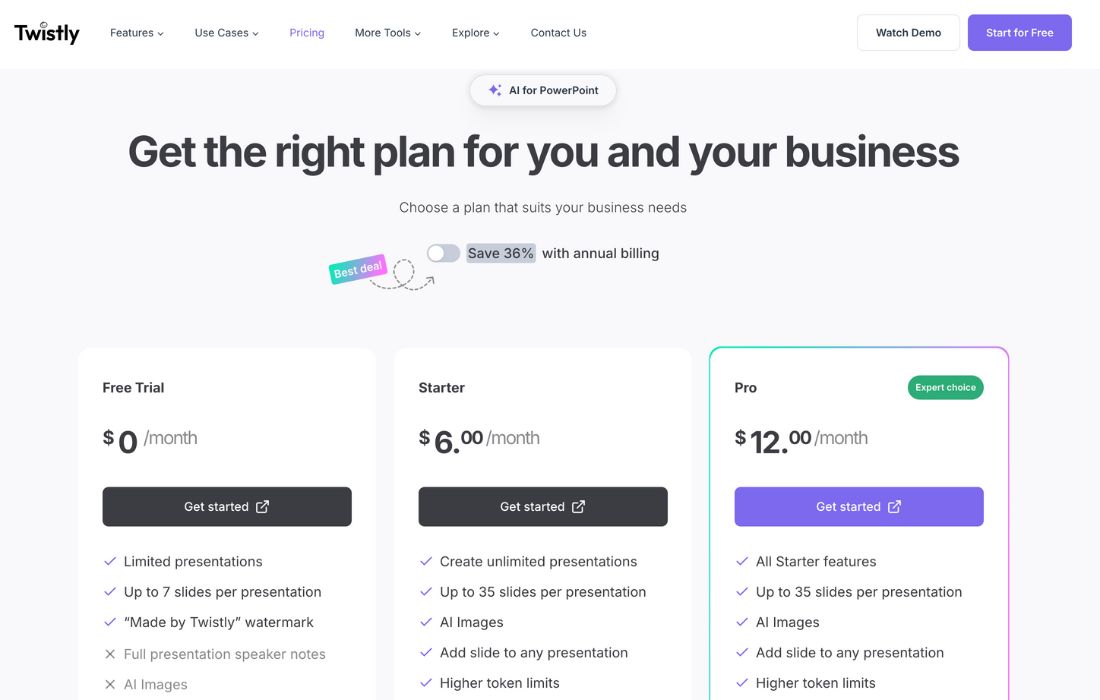
Twistly offers a simple pricing model, with both free and paid plans. This makes it easy to test before you commit.
Free Trial
- Create presentations with limited input types
- Basic templates and visual themes
- PowerPoint integration included
- Watermark on exported slides
- Ideal for quick tests or light use
Good for casual users, students, or first-time testers
Pro Plan (Paid)
- Access to all input types (text, video, PDF, URLs, voice)
- Advanced design options and more templates
- No watermark on presentations
- Priority processing and faster rendering
- Commercial usage rights included
- Starts at an affordable monthly rate (check official pricing here)
Best for professionals, educators, marketers, or teams who create slides often
Is It Worth Upgrading?
If you build presentations weekly — or spend hours formatting content — then yes, upgrading is worth it. Twistly will likely save you several hours per week, especially if you work with long documents or video scripts.
For marketers and content creators, the Pro plan pays for itself in time saved alone.
Who Should Use Twistly.ai?
Twistly isn’t just a tool for slides — it’s a time-saver for anyone who creates content regularly. Whether you work solo or in a team, if presentations are part of your job, Twistly can help.
Here’s who benefits the most:
Educators and Trainers
Turn lessons, PDFs, or recorded lectures into clean, structured slides in minutes. Perfect for online courses, workshops, or classroom teaching.
Marketers and Content Creators
Repurpose blog posts, YouTube videos, or lead magnets into visual presentations. It’s ideal for building decks for campaigns, pitches, or webinars — fast.
Consultants and Freelancers
Create professional client presentations without hiring a designer. Just feed in your brief, and let Twistly build the base slides for you.
Students and Academic Presenters
Write a script or essay? Convert it into a presentable deck without wasting hours in PowerPoint. Saves time and boosts clarity.
Knowledge Workers and Team Leads
Use it to summarize reports, onboard new employees, or explain internal processes. Perfect for making internal slides without starting from scratch.
Who Might Not Need It
- Designers who want full creative control
- Teams with strict brand guidelines that require custom formatting
- Users without Microsoft PowerPoint (since Twistly is a PowerPoint add-in)
Twistly is best for users who want speed, clarity, and ease — not just aesthetics.
What Makes Twistly.ai Unique?
There are many AI tools that promise to make slides faster. But Twistly.ai stands out for a few key reasons.
Works Inside PowerPoint
Unlike many AI tools that force you to use their own platform, Twistly runs directly inside Microsoft PowerPoint. You don’t need to learn a new app or switch between tools.
That means:
- No exporting or reformatting
- Full compatibility with your existing slides
- Easier collaboration in shared decks
This alone saves a ton of time.
Turns Video into Slides — Automatically
One of Twistly's most impressive features is its video-to-slide conversion. You can paste a YouTube link, and Twistly will:
- Analyze the content
- Pick out key ideas
- Build a slide deck with summaries and visuals
That’s a huge win for creators, coaches, and educators who want to repurpose long-form content quickly.
AI That Understands Context
Twistly doesn’t just break content into chunks. It summarizes, organizes, and explains ideas in a way that actually makes sense on slides.
Whether you start with a blog post or a video, the AI creates:
- Logical structure (intro, body, conclusion)
- Slide headlines that flow
- Bullet points that support your message
- Optional speaker notes
That’s more than just formatting — it’s real content assistance.
Speed Without Complexity
Many presentation tools are slow or require dozens of decisions. Twistly keeps things simple. You choose your input, and within seconds, you get a usable draft.
You can then polish it inside PowerPoint — where most people already work.
Built for Real-World Use
Twistly is not just a demo tool. It’s used by over 3 million people, including teachers, business teams, coaches, and marketers. It’s constantly improving based on real user feedback.
In short, Twistly combines AI content generation with real productivity. It's one of the few tools that delivers speed, structure, and seamless integration — all in one place.
Twistly.ai Tutorials and Resources
Even if you’re new to AI tools, Twistly.ai makes it easy to get started. You don’t need a background in design or presentation tools. Everything is built with simplicity in mind.
Here’s how Twistly supports its users:
Video Walkthroughs
Twistly offers short, clear tutorials that show you:
- How to turn a YouTube video into slides
- How to generate a presentation from text or PDFs
- How to edit slides directly inside PowerPoint
These videos are hosted on their site and YouTube channel. Most are under five minutes — perfect if you’re short on time.
In-App Guidance
Once installed, the PowerPoint add-in includes helpful tooltips and prompts. You’ll see suggestions based on your input type and what you're trying to create.
This makes the learning curve very smooth, even for first-time users.
Help Center and Documentation
Twistly has a dedicated support section with articles on:
- Installation and setup
- File types and supported inputs
- Troubleshooting common errors
- Account and billing questions
Everything is written in plain language. You won’t need to guess your way through.
Live Support and Community Feedback
Pro users get access to faster support. And since Twistly is growing fast, they actively collect user feedback to improve the product.
They also highlight new features and improvements regularly — so you're not left behind.
Easy to Install, Easier to Use
The installation process takes just a few clicks. Once it’s added to PowerPoint, you can start building decks right away.
You don’t need a long setup or any training to get real results.
In short, Twistly gives you everything you need to hit the ground running. Whether you learn by watching, reading, or doing — they’ve got you covered.
How We Rated Twistly.ai
We scored Twistly based on what matters most: accuracy, speed, usability, and real-world value. Here's how it performed in each category.
| Criteria | Score (out of 5) | Why It Matters |
| Accuracy and Reliability | ⭐⭐⭐⭐☆ (4.5) | Consistently extracts and summarizes key content well. A few visuals need edits, but the structure holds up. |
| Ease of Use | ⭐⭐⭐⭐⭐ (5.0) | Clean UI, fast onboarding, and works inside PowerPoint. Great for beginners and busy pros. |
| Functionality and Features | ⭐⭐⭐⭐☆ (4.5) | Supports text, video, PDF, and prompt inputs. Handles many tasks, though design options could expand. |
| Performance and Speed | ⭐⭐⭐⭐☆ (4.0) | Most decks generate in 30–60 seconds. Occasional lags with large PDFs or long videos. |
| Customization and Flexibility | ⭐⭐⭐⭐☆ (4.0) | You can edit inside PowerPoint, but style options are limited unless you customize manually. |
| Data Privacy and Security | ⭐⭐⭐⭐☆ (4.0) | Cloud-based processing, but no major red flags. Not ideal for highly sensitive content. |
| Support and Resources | ⭐⭐⭐⭐☆ (4.5) | Solid tutorials, help docs, and onboarding. Premium support is fast and helpful. |
| Cost-Efficiency | ⭐⭐⭐⭐☆ (4.2) | Strong value for frequent users. Free version is great for light use, Pro plan pays off quickly. |
| Integration Capabilities | ⭐⭐⭐⭐⭐ (5.0) | Full PowerPoint integration is a standout feature. No need to leave your workspace. |
Overall Score: 4.4 out of 5
Twistly.ai scores high in every key area. It is especially strong in ease of use, integration, and speed. While its visual design options could improve, the time savings and built-in structure make it a smart choice for most users.
Great — here’s the Final Summary section, written to wrap everything up clearly, confidently, and with a compelling call to action:
Final Summary: Is Twistly.ai Worth It?
After testing Twistly.ai in real-world scenarios, one thing is clear:
Yes, AI can make better slides — when the tool is built right.
Twistly.ai stands out for its speed, simplicity, and deep integration with PowerPoint. It helps you go from raw content to structured slides in less time, with less effort.
Whether you're turning a YouTube video into a teaching deck, summarizing a report, or building slides from a script, Twistly gives you a fast, usable draft — often in under a minute.
It’s not a replacement for designers. And if your brand needs pixel-perfect visuals, you’ll still want to tweak things. But for the 90% of decks that just need to be clean, clear, and on time, Twistly delivers exactly that.
Final Thoughts
If you:
- Build presentations weekly
- Want to save hours on formatting
- Work inside PowerPoint
- Need to repurpose content often
Then Twistly.ai is absolutely worth trying. Start with the free version, and you’ll see the time savings almost immediately.
Once you try it, you may never want to build slides manually again.
