






Meetings are essential. But they’re also a productivity black hole.
Think about it.
You spend hours every week in meetings, nodding along, scribbling half-readable notes, and praying you won’t forget the critical points later.
But let’s be honest…
Most of us do forget.
In fact, the average employee wastes 31 hours every month in unproductive meetings. That’s almost an entire workweek gone.
And manual note-taking?
It’s not helping. It distracts you from the actual conversation, and you still end up missing important details.
That’s why AI meeting assistants have exploded in popularity. They promise to:
- Record your meetings.
- Transcribe every word.
- Summarize the key takeaways.
If you’ve explored this space, you’ve probably come across Tactiq. It’s a well-known tool that helps with real-time transcription and summaries on Zoom, Google Meet, and MS Teams.
But here’s the thing...
Even good tools have limits.
And lately, a lot of users have been actively searching for a better solution — something more accurate, more flexible, and easier to use.
That’s exactly where MinutesLink comes in.
In this post, we’ll break down:
- Why so many users are ditching Tactiq.
- How MinutesLink compares head-to-head.
- And why it might just be the best tool to finally fix your meeting productivity.
Let’s get into it.
Why Tactiq Users Are Switching
Let’s be clear:
Tactiq isn’t a bad tool.
It’s actually pretty good for what it does.
It transcribes your meetings.
It summarizes discussions.
It integrates with popular platforms like Zoom, Google Meet, and MS Teams.
For a lot of users, that’s enough.
But if you dig into user reviews (we did), you’ll notice a pattern.
Many Tactiq users are running into the same frustrations again and again.
Here’s what’s driving them to search for alternatives like MinutesLink 👇
1️⃣ You’re stuck using Chrome.
Tactiq only works through a Chrome extension.
So if you prefer Safari or Firefox? Too bad.
Want to use a native desktop app? Nope.
One user even described this as a “huge pain” — especially for companies that use Microsoft Teams outside the browser.
2️⃣ Limited platform compatibility.
Tactiq only supports three platforms:
- Zoom
- Google Meet
- Microsoft Teams
If you use anything else (Webex, Skype, GoToMeeting, etc.), you’re out of luck.
3️⃣ Stingy free plan.
The free version gives you just 10 transcriptions per month.
That’s barely enough to cover a week’s worth of meetings — let alone a full month.
Most users hit the limit quickly and have to upgrade or look elsewhere.
4️⃣ Accuracy isn’t consistent.
Tactiq struggles with:
- Accents (especially non-American ones).
- Multiple speakers.
- Bilingual meetings.
One reviewer even mentioned that with an Indian accent, “the whole story changes” due to transcription errors.
5️⃣ No audio or video recording.
If you want to replay a meeting or double-check what was said, Tactiq can’t help.
It doesn’t record audio or video.
You’d need a separate tool just for that.
6️⃣ Internet connection required.
No offline support. If your internet cuts out — so does Tactiq.
7️⃣ Occasional billing and support headaches.
Some users have reported billing issues and slow customer support responses. Not a dealbreaker, but definitely annoying.
Bottom line?
Tactiq works fine for light users who:
- Use Chrome.
- Stick to the big three video platforms.
- Don’t mind limited transcription.
But for serious professionals and teams who want accurate, flexible, and reliable meeting documentation?
It’s not enough.
That’s why many are switching to MinutesLink.
✅ If you’re happy with this section, I’ll move on to Section 2: MinutesLink — A Better Alternative (Overview) next. Continue?
Meet MinutesLink: The Smarter Tactiq Alternative
If you’ve ever thought,
"I just want a tool that actually works and doesn’t make me babysit it,"
MinutesLink is what you’ve been looking for.
This isn’t just a Tactiq clone with a new logo. MinutesLink is a new AI note taker with research features baked in, designed to fix the exact problems that frustrate Tactiq users. MinutesLink was built from the ground up to fix the exact problems that frustrate Tactiq users.
Here’s what makes it different:
🔎 Accuracy that’s (almost) human.
MinutesLink’s transcriptions aren’t just “pretty good.”
They use advanced natural language processing and speaker recognition to hit human-level accuracy.
Even in tricky situations like:
- Complex jargon.
- Multiple speakers.
- Non-native accents.
- Bilingual conversations.
You get clear, reliable meeting notes without having to constantly review or correct them.
🔊 Records and transcribes.
Tactiq can only transcribe.
MinutesLink records your meetings too — for free.
That means you can:
- Re-listen anytime.
- Double-check details.
- Never worry about missing context again.
No need to juggle two different tools.
📝 Summaries that actually help.
MinutesLink doesn’t just dump text into a document.
It creates detailed, actionable summaries that highlight:
- Key takeaways.
- Decisions.
- Action items.
You can stop writing follow-up emails from scratch. MinutesLink does it for you.
🌍 Browser-free, hassle-free.
Use Chrome? Great.
Prefer Safari or Edge? Also great.
MinutesLink works anywhere — no extensions or installs required.
Your IT team will thank you.
🌐 Speak your language (literally).
MinutesLink supports 50+ languages and automatic language detection.
So whether your meetings switch between English, Spanish, Hindi, or French, you’re covered.
🔎 Search past meetings instantly.
MinutesLink includes an advanced meeting search tool so you can find old discussions in seconds.
No more scrolling through endless folders or asking teammates, “When did we say that?”
The short version?
If Tactiq is a basic note-taker,
MinutesLink is your full meeting assistant.
It gives you:
- More accuracy.
- More flexibility.
- More time back in your day.
Excellent. Now let’s move to Section 3: MinutesLink vs Tactiq — Why MinutesLink Wins.
MinutesLink vs Tactiq: Why MinutesLink Wins
Let’s cut to the chase.
If you’re choosing between Tactiq and MinutesLink, here’s how they really stack up:
| Feature | Tactiq | MinutesLink |
| Transcription Accuracy | Good (but struggles with accents & jargon) | Human-level accuracy even in complex discussions |
| Audio Recording | ❌ | ✅ Included for free |
| AI Summaries | Basic summaries | Detailed, actionable summaries |
| Browser Dependency | Chrome only | Browser-free (works everywhere) |
| Platform Support | Zoom, Google Meet, MS Teams only | Supports multiple platforms |
| Language Support | 30+ languages | 50+ languages + automatic detection |
| Offline Support | ❌ | Coming soon |
| Free Plan Limits | 10 transcriptions/month | Unlimited recordings + 10 free AI calls/month |
| Deep research / insights | ❌ | ✅ Included (AI-powered meeting search) |
Here’s what that means for you 👇
- Tired of correcting messy transcriptions? MinutesLink’s accuracy solves that.
- Sick of juggling multiple tools for recording? MinutesLink has it built in.
- Want clear action points after meetings? MinutesLink delivers detailed summaries.
- Use a browser other than Chrome? No problem.
- Run multilingual or complex meetings? MinutesLink handles it with ease.
Simply put…
If you value accuracy, flexibility, and time savings, MinutesLink is the obvious choice.
Beyond Transcription — Extra Features That Save You Time
Most people just want reliable transcriptions and summaries.
But once you start using MinutesLink, you’ll notice it quietly solves other headaches too.
Here’s what else you get 👇
✅ Unlimited recording storage
Forget paying extra for cloud storage or worrying about deleting old meetings.
MinutesLink stores your recordings without limits.
✅ Multi-call recording (5+ concurrent meetings)
Running multiple meetings at once?
No sweat.
MinutesLink can record and transcribe several meetings at the same time — perfect for busy teams, agencies, or anyone juggling multiple projects.
✅ Free auto-sharing of notes
Want to share meeting minutes with teammates or clients?
Auto-sharing is included for free.
No more copy-pasting or downloading files manually.
✅ Integrated calendar
Connect your calendar and let MinutesLink:
- Automatically join scheduled meetings.
- Start recording and transcribing without any clicks.
It’s one less thing to think about.
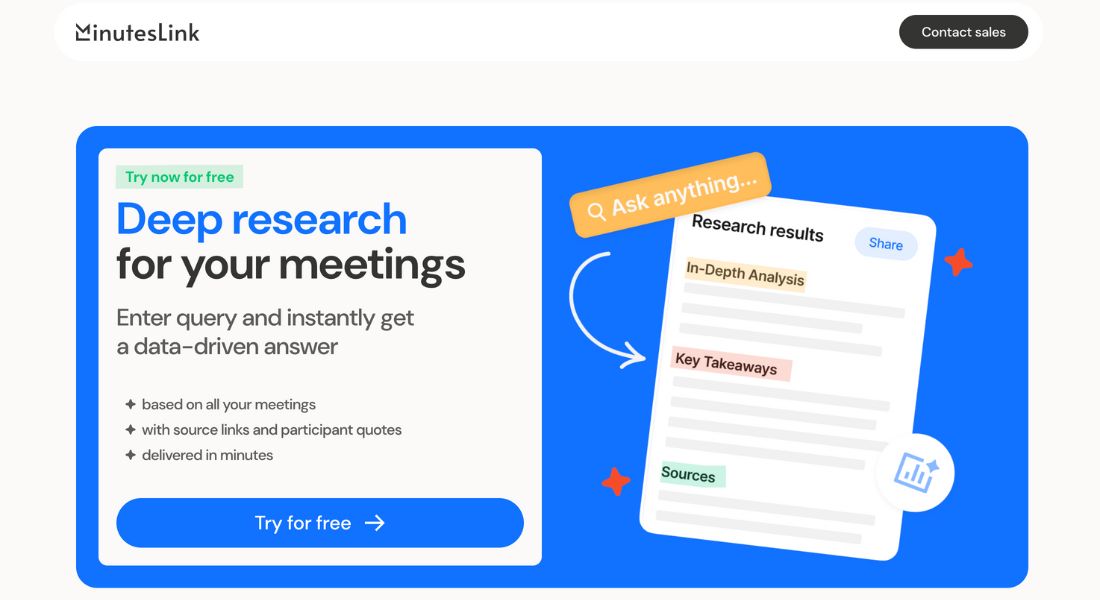
✅ Deep research across all your meetings
MinutesLink isn’t just a new AI note taker with research — it’s also your team’s knowledge hub.
With the deep research feature, you can:
- Enter any query.
- Instantly pull data-driven answers based on all your past meetings.
- See source links and participant quotes.
- Get answers delivered in minutes.
No more scrolling through transcripts or folders.
Just type your question — and MinutesLink delivers research-backed insights in seconds.
Tactiq doesn’t offer anything like this.
✅ Trusted by professionals & businesses
This isn’t just marketing hype.
Real users — from software engineers to sales teams — say MinutesLink has:
- Saved time.
- Improved team collaboration.
- Helped track action items without anyone needing to take manual notes.
Some even called it a “game changer.”
Bottom line?
MinutesLink doesn’t just transcribe your meetings.
It streamlines your entire workflow, from recording to sharing to follow-ups.
Pricing — and Why MinutesLink Gives You More Bang for Your Buck
Let’s face it.
Price matters.
But value matters more.
Here’s how Tactiq and MinutesLink compare on cost 👇
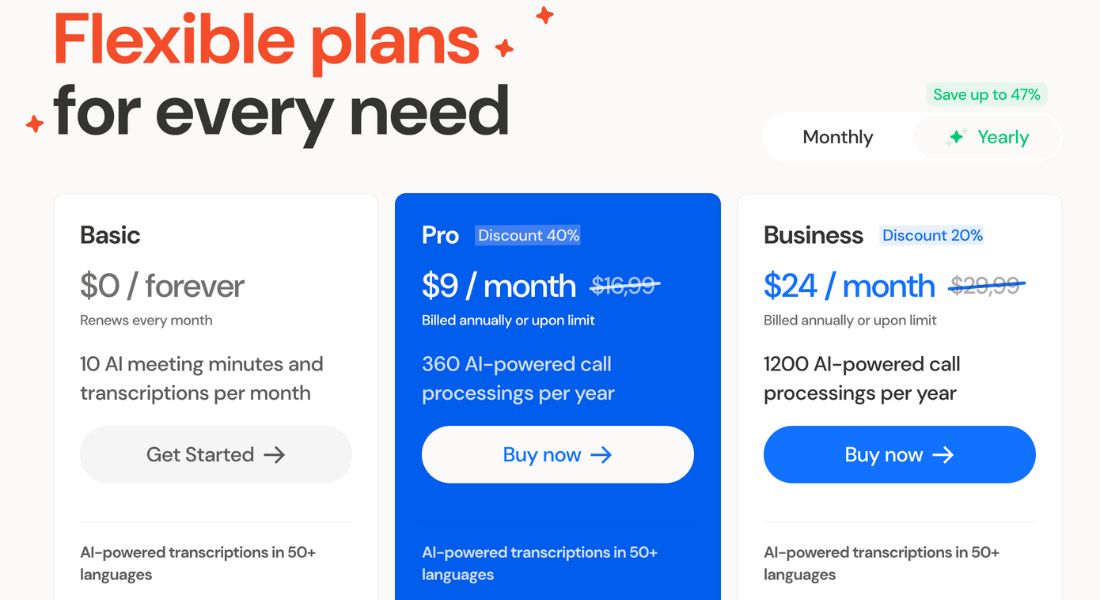
| Plan | Tactiq | MinutesLink |
| Free | 10 transcriptions/month | Unlimited recordings + 10 AI calls/month |
| Pro | $8/month | $9/month |
| Business/Team | $16.70/month | $24/month |
Now, let’s be honest.
Yes — MinutesLink’s Pro plan is $1/month more than Tactiq’s.
But what does that extra dollar get you?
| Included Feature | Tactiq Pro | MinutesLink Pro |
| Accurate transcriptions | ✅ | ✅ (but better accuracy) |
| Audio recording | ❌ | ✅ |
| Actionable summaries | Basic | Detailed + Action items |
| Browser independence | ❌ | ✅ |
| Multi-language support | 30+ languages | 50+ + auto-detect |
| Advanced search | ❌ | ✅ |
So what’s the real difference?
If you just want bare-bones transcription inside Chrome — go with Tactiq.
But if you want:
- Accurate notes you can trust
- Recordings you can replay anytime
- Actionable summaries that save time
- Freedom to use any browser or platform
MinutesLink gives you way more for the price.
Who Should Use MinutesLink (and Who Shouldn’t)
Let’s keep it real.
MinutesLink isn’t for everyone.
Here’s who will love it — and who might be better off sticking with Tactiq.
👤 MinutesLink is perfect for you if:
✅ You want accurate, human-level transcriptions — especially for meetings with multiple speakers, diverse accents, or complex topics.
✅ You need actionable summaries, not just basic meeting notes.
✅ You value having audio recordings and transcripts together (no more juggling two tools).
✅ You work across multiple browsers and platforms — or just don’t want to be locked into Chrome.
✅ You run multilingual or bilingual meetings and want automatic language detection.
✅ You care about saving time and reducing manual note-taking.
👤 Stick with Tactiq if:
✅ You only need basic real-time transcription.
✅ You work exclusively in Chrome.
✅ You want the lowest possible monthly cost and are fine with fewer features.
The verdict?
If you’re a tech-savvy entrepreneur, remote team leader, marketer, or content creator who wants precise meeting notes and flexible tools…
👉 MinutesLink is hands-down the better choice.
✅ If this looks good, I’ll now write the Conclusion + CTA to close it out strong.
Shall we?
Final Verdict: Meetings Done Right
Meetings are supposed to help you make decisions and move projects forward.
Not waste your time.
Not leave you drowning in half-baked notes.
And definitely not force you into clunky tools with browser limits.
That’s why more and more teams are switching from Tactiq to MinutesLink.
Because with MinutesLink, you get:
- ✅ Human-level accurate transcriptions
- ✅ Detailed, actionable AI summaries
- ✅ Audio recording built in — free
- ✅ Browser independence (use any platform you like)
- ✅ Support for 50+ languages
- ✅ Unlimited free recordings (even on the free plan)
It’s not just about taking notes.
It’s about transforming how your team captures, reviews, and acts on meeting insights.
Ready to stop missing important details?
Try MinutesLink free today and turn your meetings into productivity powerhouses — not time drains.
FAQ
What makes MinutesLink better than Tactiq?
MinutesLink offers superior transcription accuracy, audio recording, detailed AI summaries, browser flexibility, and broader language support.
Does MinutesLink work outside of Chrome?
Yes. Unlike Tactiq, MinutesLink is browser-independent and works across all major browsers.
Can I use MinutesLink for free?
Yes. The free plan includes unlimited recordings and 10 free AI-processed calls per month.
