





Wish you could create engaging video content without showing your face? You're not alone! With a faceless AI avatar, you can effortlessly produce professional videos that attract followers, build authority, and maintain your privacy—all on a tight budget.
In this easy-to-follow guide, I'll show you exactly how to bring your AI avatar to life and create content that resonates with your audience. Let's dive in!
Step 1: Create Your Avatar (with Examples!)
Your AI avatar sets the tone for your content, so let's make it memorable! We'll use Leonardo.ai, a user-friendly AI tool perfect for beginners and experts alike.
👉 How to Generate Your Avatar:
Copy and customize this prompt to create your Pixar-style avatar quickly:
Real-Life Examples:
- Tech Niche:
- "Caucasian female working as a software developer, Pixar-style animation, friendly facial expression, clearly facing the camera, no shadows, sitting comfortably at a desk, minimalistic tech office."
- Fitness Niche:
- "African-American male working as a fitness coach, Pixar-style animation, friendly facial expression, clearly facing the camera, no shadows, sitting comfortably at a desk, bright gym background with fitness gear."
- Digital Marketing Niche:
- "Asian female working as a digital marketer, Pixar-style animation, friendly facial expression, clearly facing the camera, no shadows, sitting comfortably at a desk, vibrant home-office background with marketing books."
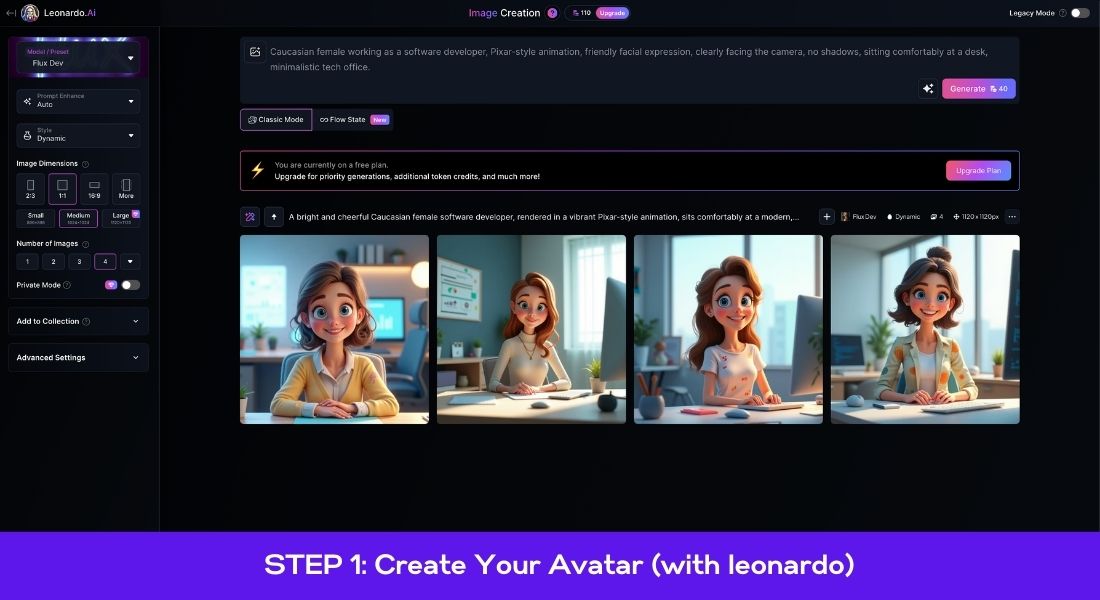
Visual example: Caucasian female working as a software developer, Pixar-style animation, friendly facial expression, clearly facing the camera, no shadows, sitting comfortably at a desk, minimalistic tech office.
🔑 Pro Tip:
Experiment by tweaking ethnicity, background, and setting to match your brand’s personality perfectly. Try at least two variations to find your favorite!
- Cost: Free ($0)
For more options, explore these Best AI Avatar Generators.
Step 2: Generate Engaging Content Ideas (Step-by-Step)
Feeling stuck on what videos to create? Here’s a simple strategy to generate unlimited content ideas quickly and easily.
🔍 Step-by-step process:
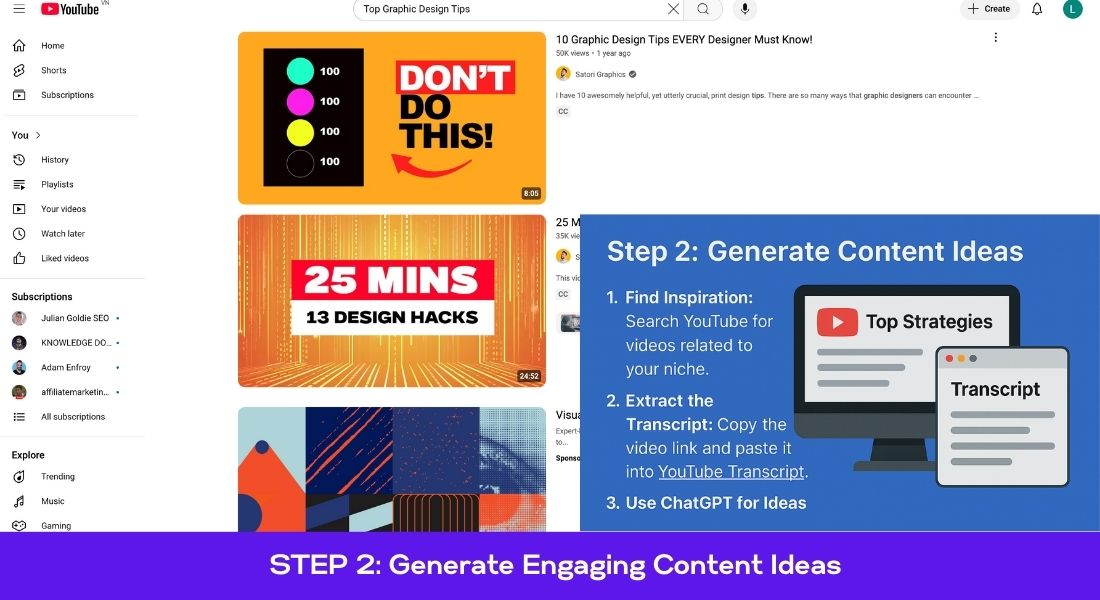
① Find Inspiration on YouTube
- Head to YouTube and search
"Top [Your Niche/Service] Tips". - (Example: "Top Graphic Design Tips")
- Choose a popular video with lots of views and good engagement.
② Grab the Video Transcript
- Copy the video's URL.
- Go to YouTubeTranscript.com, paste the URL, and instantly get the transcript.
③ Let ChatGPT Do the Work
- Open ChatGPT and start with this prompt:
"You’re a professional TikTok scriptwriter. First, carefully read the following video transcript. Reply only with ‘OK’ when you're done:
[Paste Transcript Here]"*
- After ChatGPT replies "OK," follow up with:
"Now, based on the transcript, give me 10 fresh, engaging ideas for short, educational videos (each about 1 minute long)."
Example output:
- "5 Graphic Design Mistakes Beginners Always Make"
- "How to Design Better Social Media Graphics"
- "The Quick Guide to Choosing Perfect Fonts"
- (... and more!)
④ Refine Your Favorite Idea into a Script Pick your favorite idea and use this structured prompt to turn it into a compelling script:
"Write a 30-second engaging and educational video script on [Chosen Idea]. Structure it clearly:
- Negative Hook (grab attention by highlighting a common mistake or frustration)
- Explain the problem quickly
- Provide 2-3 actionable, clear tips to solve it
- Include one relatable example or quick story"
Example result:
- Hook: "Are your social media graphics getting zero clicks? Here's what you're missing!"
- Problem: "Poor graphic design can make your content invisible."
- Tips: "Choose bold, readable fonts, pick contrasting colors, and keep text minimal."
- Example: "For instance, Netflix thumbnails grab attention with bold imagery and minimal text."
⑤ Final Touches:
- Edit the generated script so it sounds conversational and authentic to your voice.
🔑 Pro Tip:
Save your best-performing ideas in a content calendar or spreadsheet for future use. This ensures you always have fresh ideas ready to go!
- Cost: Completely free ($0)
For further tips, check out How to Create A Faceless YouTube Channel Using AI In 2024.
Step 3: Add a Realistic & Engaging Voice
Your avatar deserves a voice that's clear, authentic, and enjoyable to listen to. Let's create one using Eleven Labs, a powerful AI voice generator that's easy and fun to use.
🎙️ Step-by-step guide:
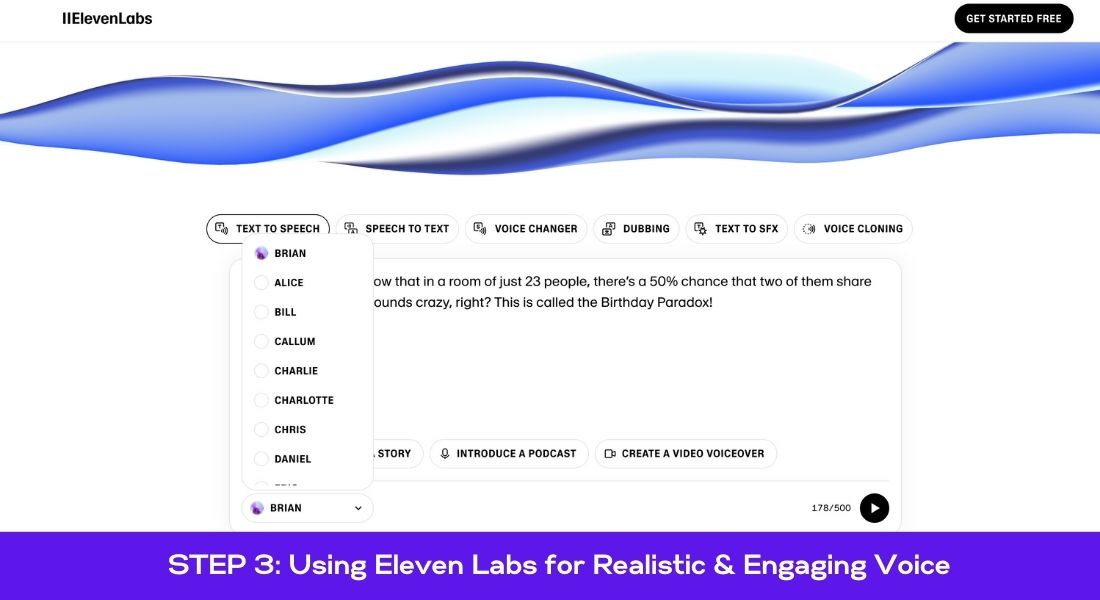
① Visit Eleven Labs
- Head over to Eleven Labs and sign up for a free account if you haven't yet.
② Pick the Perfect Voice
- Go to the VoiceLab feature.
- Experiment with different voice types:Male or female tones
- Warm, professional, or casual styles
- Accent variations to match your avatar’s persona
Example:
- A warm, confident male voice for a fitness avatar.
- A friendly, upbeat female voice for digital marketing tips.
③ Generate Your Audio
- Paste your polished script (from Step 2) into the text box.
- Preview a few voices to hear what fits best.
- Click "Generate" and download your finalized audio file.
④ Save & Reuse
- Once you find your favorite voice, save it as your avatar's official voice.
- (Consistency helps your audience instantly recognize your content!)
🔑 Pro Tip:
Always listen to your audio carefully—make minor adjustments (speed, pitch, emphasis) within Eleven Labs to ensure the speech sounds natural, conversational, and professional.
- Cost: Free tier available ($0)
Alternatively, explore more AI-driven voice tools like VSub.io.
Step 4: Bring Your Avatar to Life (Animation)
This is the fun part—making your avatar move and speak naturally! We’ll use HeyGen, a simple tool that quickly turns your static image into a lifelike animated character.
🎬 Step-by-step guide:
① Sign Up & Access HeyGen
- Go to HeyGen and start your subscription (they offer a free trial if you want to test first).
② Upload Your Avatar
- Click on the “Talking Video” feature.
- Upload the AI-generated avatar image from Step 1.
③ Adjust for Best Visual Impact
- Select the half-body option for a natural framing.
- Resize or expand the image so your avatar fits neatly in the frame without distortion or stretching.
④ Add Your Audio
- Upload the voice file created with Eleven Labs (Step 3).
- Double-check alignment and playback to ensure voice and animation sync well.
⑤ Generate & Preview Your Video
- Submit your project, wait a few moments, and preview your animated video.
- If needed, you can easily make adjustments or re-upload your audio to get it perfect.
🎯 Troubleshooting Quick Tips:
- Avatar looks distorted? Adjust the aspect ratio or re-upload your image with higher resolution.
- Voice misaligned? Re-upload audio and try again, or adjust the synchronization settings within HeyGen.
🔑 Pro Tip:
Export short test videos first. This saves you time and ensures everything looks perfect before creating longer videos.
- Cost: $60/month subscription (free trial available)
For additional avatar animation tools, consider Live3D.io.
Step 5: Final Edits & Captions for Maximum Engagement
You've got a great animated video—now let's add the finishing touches to maximize your content’s impact and keep viewers watching until the very end.
🎥 Step-by-step editing guide:
① Choose an Easy-to-Use Editor
- CapCut (free and powerful) or InShot (easy mobile editing) are both great beginner-friendly options.
② Import Your Animated Video
- Upload your HeyGen-created avatar video directly into your editing software.
③ Add Captions for Viewer Engagement
- Captions help with accessibility, increase viewer retention, and grab attention even with sound off.
- Use your editor’s built-in caption feature or manually add them for precise timing.
Caption Tips:
- Choose clear, readable fonts like Montserrat or Open Sans.
- Add dynamic text animations (simple fade-ins or subtle movements) to keep attention.
- Highlight important words with bold or colored text to emphasize key points.
④ Include Engaging Visual Elements
- Add subtle background music at low volume to improve viewer experience.
- Insert quick transitions or zoom-ins at key points (e.g., during the hook or main tips) for visual interest.
🚀 Quick Editing Checklist:
- ✅ Captions accurately timed and clearly readable
- ✅ Background music at appropriate volume
- ✅ Smooth transitions and visual effects (use sparingly)
- ✅ Final video length optimized for your platform (e.g., 30–60 seconds for TikTok or Instagram Reels)
🔑 Pro Tip:
Check out editing inspiration from Editing Vault or popular creators in your niche to consistently improve your editing style and creativity.
- Cost: Free (CapCut)
For more editing tips, check out Typito, ideal for streamlined social media video creation.
🚀 Final Thoughts: Start Creating Professional Videos Today!
Creating engaging, faceless AI videos doesn’t have to be complicated—or expensive! By following this simple yet powerful workflow, you can quickly produce videos that build trust, attract followers, and elevate your online presence without ever needing to show your face.
Quick Recap:
- 🎨 Avatar Creation: Personalize your AI avatar effortlessly.
- 💡 Idea Generation: Quickly brainstorm engaging video topics.
- 🎙️ Realistic Voiceovers: Give your avatar a professional, natural-sounding voice.
- 🎬 Avatar Animation: Turn static images into animated, lifelike videos.
- ✨ Professional Editing: Polish your video with captions, music, and engaging visuals.
Now, it’s your turn! Take action and produce your first faceless AI video today. You'll be amazed how quickly your content creation skills improve—and how much your audience loves your new professional style!
📌 Pro Tip:
Bookmark this guide or share it with friends who also want an easy, affordable way to create engaging content!
🚀 Frequently Asked Questions (FAQs)
1. What is a Faceless AI Avatar?
A faceless AI avatar is a digital character created using artificial intelligence tools, allowing creators to make engaging, professional content without appearing on camera. It's ideal for anonymity, privacy, or scaling content production quickly.
2. What are the Best Tools for Making Faceless AI Videos?
Top tools include:
- Leonardo.ai for avatar design
- Eleven Labs for realistic AI-generated voiceovers
- HeyGen for lifelike avatar animation
- CapCut or InShot for easy video editing and captioning
3. Can I Create a Faceless YouTube Channel with This Guide?
Absolutely! This SOP provides everything you need to launch a faceless YouTube channel or produce viral TikTok and Instagram Reels. The workflow covers AI-driven content creation, scripting, voice generation, avatar animation, and video editing.
4. Is it Expensive to Create Faceless AI Content?
No, getting started can be done entirely for free or on a low budget. Initial steps like avatar creation, idea generation, and voiceover production cost nothing. Advanced tools like HeyGen start at $60/month, but affordable alternatives exist.
5. What Niches Work Best for Faceless AI Avatars?
Faceless AI avatars work perfectly across many niches, including digital marketing, education, coaching, finance, graphic design, and lifestyle content. They're highly effective wherever anonymity or scalability of content is important.
6. Can I Monetize Content Created with AI Avatars?
Yes! Faceless AI content can be monetized effectively through affiliate marketing, ads on platforms like YouTube, online courses, and digital products. High-quality, engaging videos created through AI automation can quickly attract loyal audiences.
7. How Do I Ensure My Faceless Videos Sound Authentic and Human?
Always choose natural-sounding voiceover settings in Eleven Labs or similar AI tools. Adjust pitch, speed, and tone for realism. Pairing realistic audio with precise animation in HeyGen further enhances authenticity.
8. Is There a Free Alternative to HeyGen for Animating Avatars?
Yes, you can try D-ID, Pictory.ai, or other affordable video automation services. These platforms offer budget-friendly entry points for creators just getting started.
9. How Can I Optimize My AI-Generated Videos for Engagement?
To maximize engagement:
- Use captivating hooks in your scripts.
- Add dynamic captions and subtitles.
- Edit your videos to match the preferred lengths of platforms like TikTok, Instagram Reels, or YouTube Shorts.
- Continuously analyze viewer feedback and adapt your video style accordingly.
10. Why Should I Use an AI Avatar Instead of Appearing on Camera?
Faceless avatars protect your privacy, allow effortless scaling of your content creation, help overcome camera shyness, and provide consistent branding. It’s ideal for creators who prefer anonymity or want to quickly produce high-quality content without filming.
