




Comparing Wordtune and Grammarly, two powerful programs, is not a simple task. Furthermore, considering that this post is sponsored by Wordtune, it's reasonable to consider a potential bias.
However, as you will soon see, I invested a significant amount of effort into thoroughly examining both programs and providing an impartial comparison to assist you in making a decision.
I have tried out various writing tools in my profession, and Grammarly and Wordtune show the most potential for several reasons.
We will talk about the characteristics and restrictions for both.
Writing instruments assist us in writing effectively when they can enhance our skills.
Therefore, I have utilized my familiarity with both of these technologies to produce a manual for you to establish:
- The key distinction between the two tools
- How to utilize their most advantageous characteristics for your work
- Widespread misunderstandings regarding them
An overview of Grammarly and Wordtune
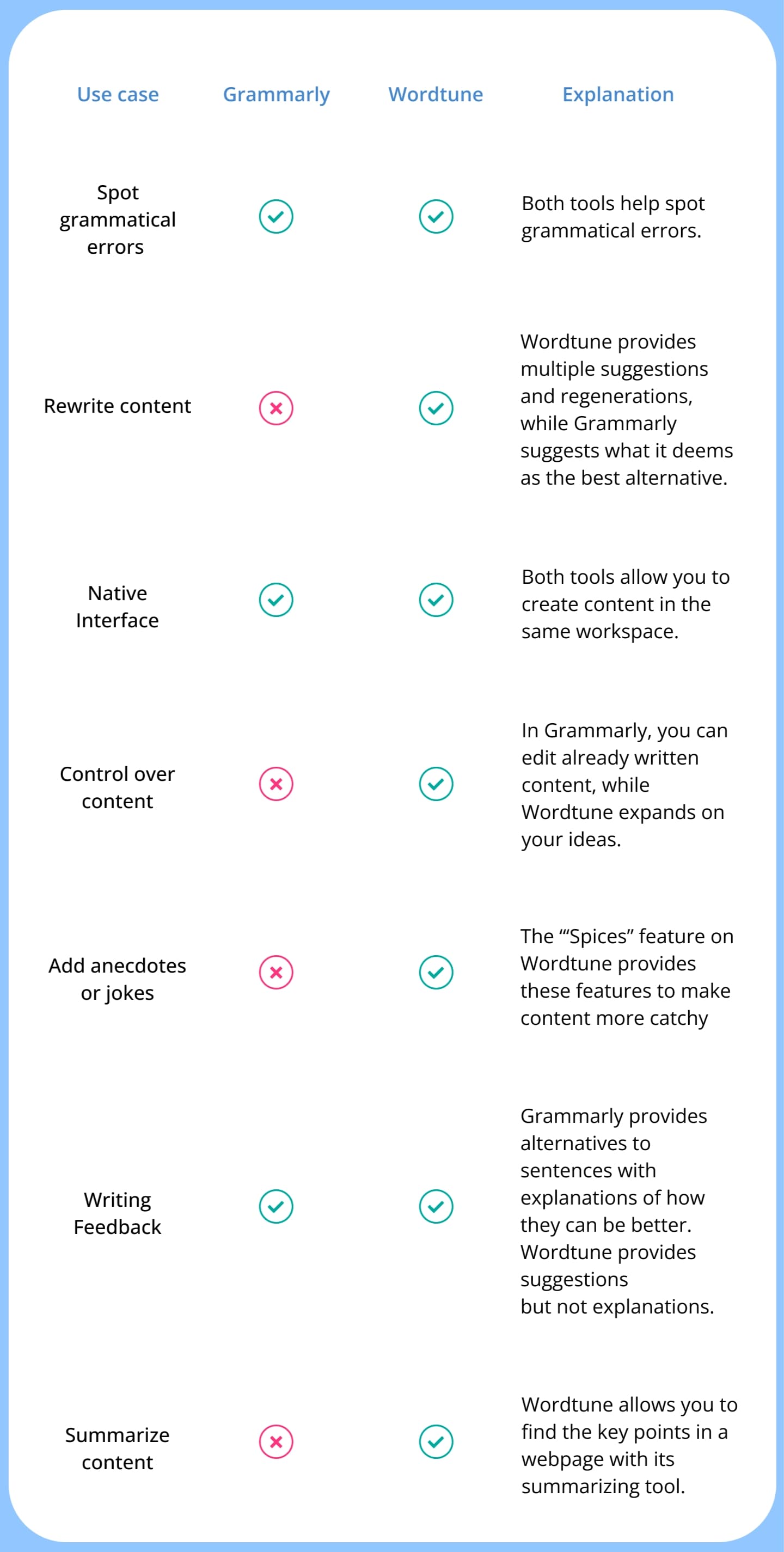
Grammarly and Wordtune are both artificial intelligence writing tools. Both assist writers in improving the quality of their writing, correcting grammatical problems, and speeding up content development.
Grammarly is excellent for correcting mistakes, addressing passive voice, and eliminating redundant words.
Wordtune enhances smoothness, restates words, eliminates unnecessary details, enables content generation using GenAI, and assists in composing concise summaries.
What is Grammarly?
Grammarly was developed by Max Lytvyn, Alex Shevchenko, and Dmytro Lider in 2009. It has numerous characteristics, but the one that is most frequently utilized is the grammar and spell check.
To utilize this tool, choose the "+" symbol upon logging into the tool. This action will prompt a new window to appear, displaying the following specifications:
To the left, there is an empty area where you can copy and paste the content you want to check. While you perform this action, Grammarly will examine the material and inform you of any grammatical, spelling, or sentence clarity issues.
Note: Grammarly also provides ideas fo
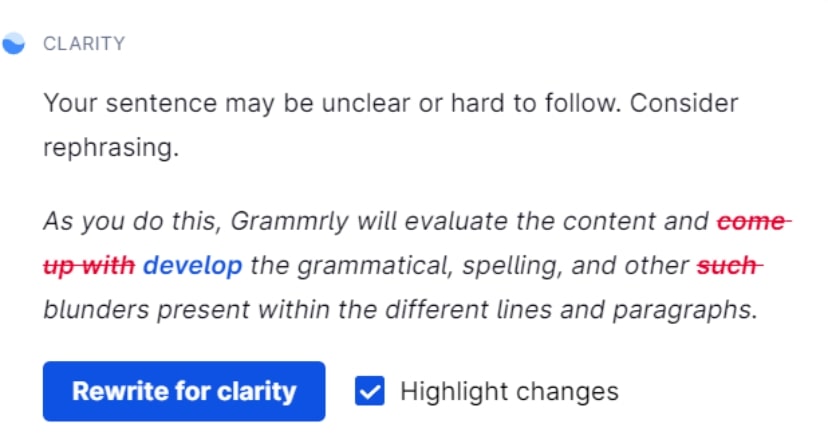
r style or tone, such as:
Additional recommendations involve "eliminating incomplete sentences" or "removing unnecessary or non-standard words" from the tool. You can also view your score for English and Grammar accuracy, correctness, clarity, engagement, and delivery.
Here is a summary of all the features:
- Spell checker: Verifies spelling and enables you to include terms that are not in its lexicon.
- Grammar check: Identifies typical grammar problems and punctuation mistakes.
- Plagiarism Checker: Verifies if your writing resembles the content on other internet web sites and enables you to improve your ranking.
- Readability score: Assesses the word count in a sentence, paragraph, and vocabulary selections according to your target audience and tone.
- Writing helper: It features an AI-powered assistant that provides new content suggestions via prompts.
What does Wordtune mean?
Wordtune enables writers to rephrase awkward sentences, adopt a formal or informal tone, or enhance their writing.
It serves various purposes, such as:
- Shorten
- Expand
- Formal tone
- Personal tone
- Rewriting
Wordtune is not only a regular grammar and plagiarism checker. It is a tool that can generate comprehensive blogs, letters, emails, captions, and even memorandums for official purposes.
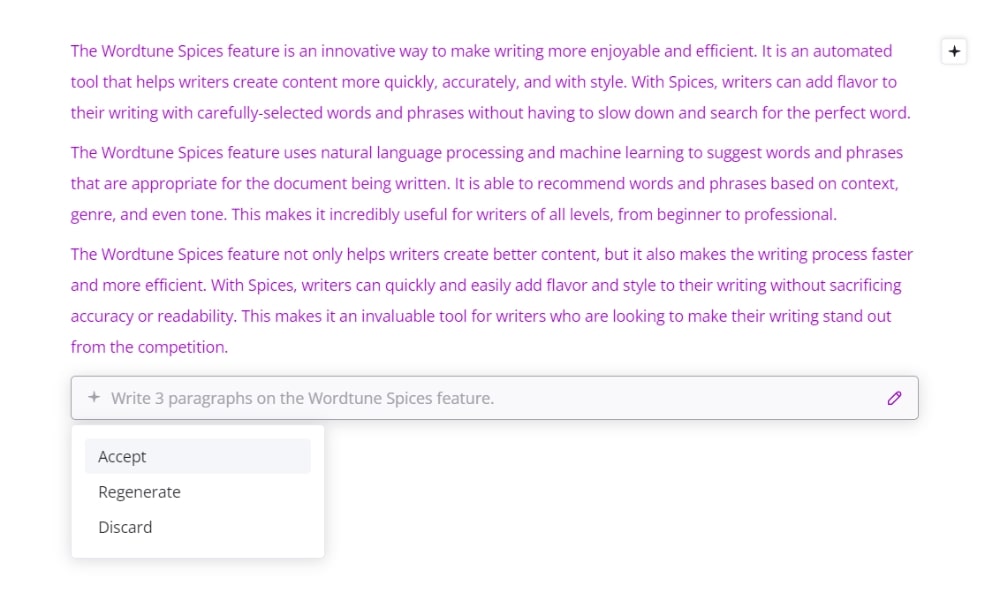 It took Wordtune 20 seconds to generate these three paragraphs that provide an explanation:
- The effect it has on writing and how it improves your ideas.
- It employs natural language processing and machine learning.
- Wordtune helps improve the efficiency of content.
If you need to achieve a particular word count, utilize the expand function, or if you're beyond the limit, utilize the shorten function.
A Comparison of Grammarly and Wordtune
The decisive moment!
I have tried out these features to provide you with examples of how you might use them for both personal and business purposes.
Interface
Grammarly
Grammarly provides a user-friendly interface that lets you easily copy and paste text and receive suggestions in real-time.
Google Docs version: Grammarly's suggestions appear as different colored highlights (red, blue, green, and purple) and grow when you mouse over them. To examine the advice more closely, you need to click on 'See more in Grammarly' located at the bottom of the suggestion box. A sidebar is displayed, showing suggestions arranged in chronological order.
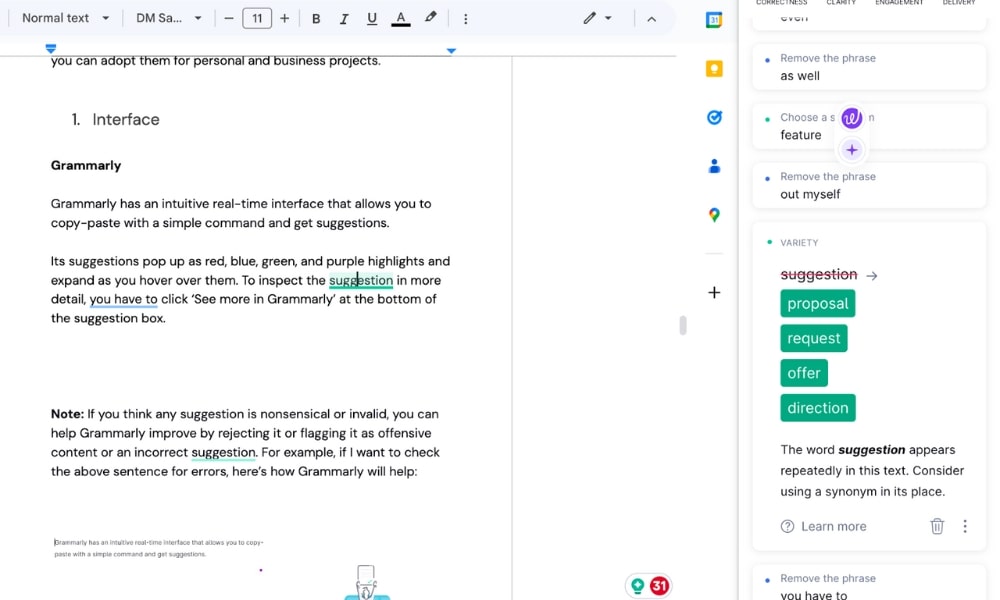
Please note that if you believe any suggestion is not genuine, you can assist Grammarly in enhancing its accuracy by rejecting it or marking it as inappropriate or inaccurate.
Wordtune
Wordtune offers a very advanced UI. You can modify content in several methods, such as using copy+paste to rephrase and using prompts to generate content. As an illustration:
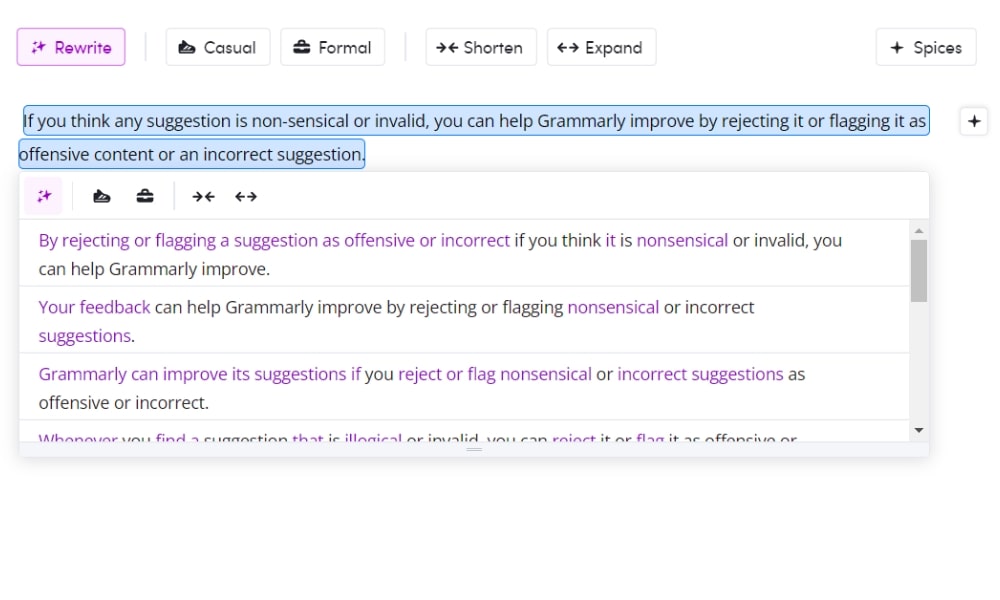
I used Wordtune to edit this text, and it provided several suggestions that made my content more concise and practical for the audience.
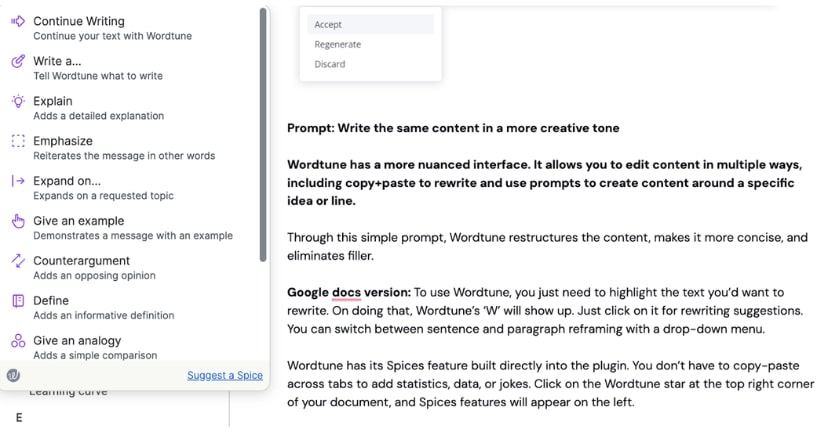
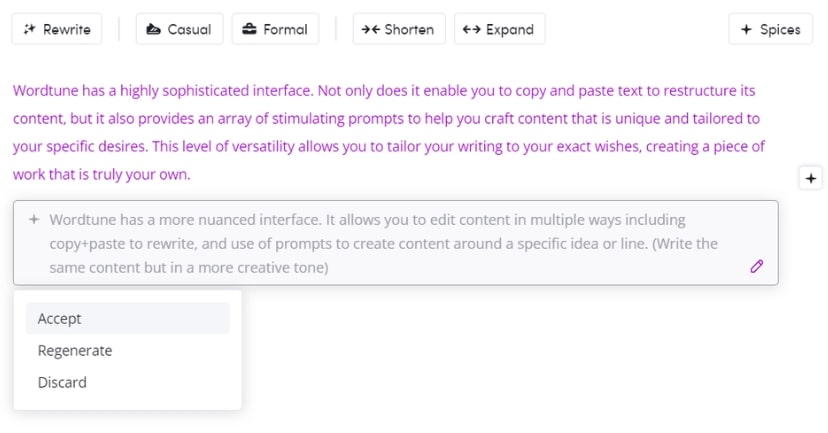 Prompt: Rewrite the text using vocabulary that is more imaginative
Wordtune features a more detailed interface. You can modify material in several methods, such as using copy+paste to revise and using prompts to generate content based on a specific idea or line.
Using this basic command, Wordtune rearranges the text, makes it shorter, and removes unnecessary words.
Google documents version: To using Wordtune, simply select the text you wish to rephrase. By doing that, Wordtune's 'W' will appear. Simply select it to view suggestions for rewriting. You have the option to alternate between sentence and paragraph restructuring using a drop-down menu.
Wordtune has its Spices functionality included directly into the plugin. You don't need to manually transfer information across tabs in order to include statistics, facts, or humor. Click on the Wordtune icon located in the upper right corner of your manuscript, and the Spices features will be displayed on the left side.
Generating Content
Grammarly
You can describe Grammarly as a tool for content creation rather than a helper that generates stuff from nothing. You can use it to refine existing material and verify it for plagiarism.
It improves the quality of your work by offering suggestions on how to enhance the material through little modifications and substitutions.
Its main function in content development is to act as a proofreader and eliminate various errors that human eyes miss at first sight. Therefore, it saves time, teaches individuals who are not native speakers, and also adds more significance to a piece of text.
Wordtune
Wordtune is a comprehensive writing companion. It supports content production from the beginning, and you can utilize it for various purposes throughout.
For instance, here's how you can utilize it to generate a social media post in a sequential manner:
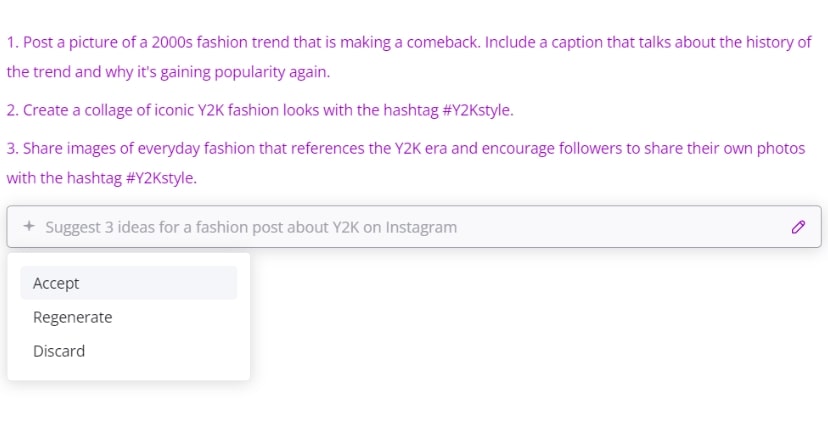
We begin with the process of generating ideas.
Prompt: Propose 3 concepts for a fashion post about the Y2K era on Instagram
I was impressed by the outcomes of Wordtune for the following reasons:
- The concepts are not just titles but also provide instructions on how to generate them with a description, keyword, etc.
- The concise nature of it is remarkable since it avoids generating nonsensical information that can perplex the consumer with additional unintelligible content.
- The concepts not only center around finishing the task but are fashionable, minimizing the requirement for extensive investigation.
The second phase is the creation.
I selected the second suggestion proposed by the tool and included the following prompt to continue with the subsequent stage.
Prompt: What are the most popular Y2K trends? (To make a collage on Instagram)
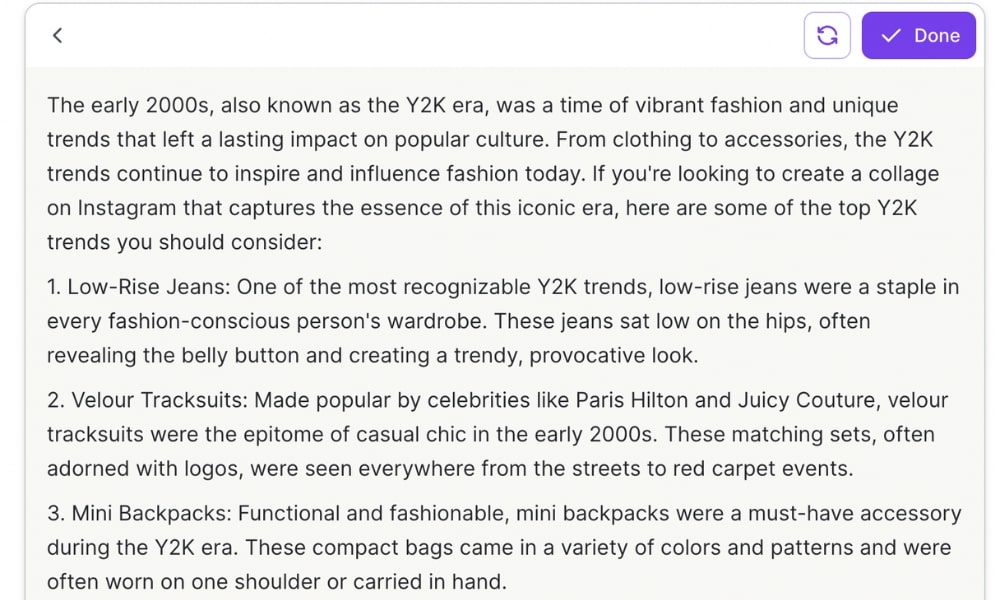
This recommendation got my attention because it doesn't begin like a blog but clarifies the content of Y2K trends. Currently, I possess a structure for producing a compilation of Y2K trends on my account and a method of investigation to locate suitable photographs.
The final step is to create a caption and hashtags, and then we are finished!
Prompt: Generate 5 caption concepts with hashtags for a Y2K trends collage to share on Instagram. Make it imaginative and spirited.
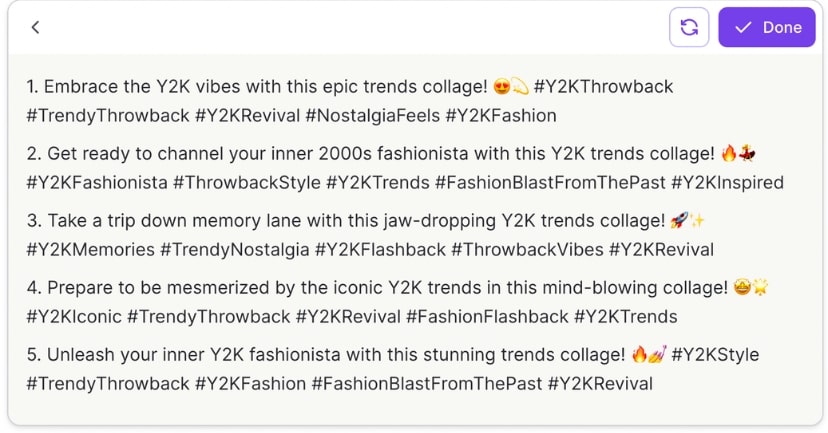
These captions are perfect because they won't occupy much space in my timeline and will match the limited attention span of users.
Now that all my post pieces are completed, I can plan it on my social media scheduling tools.
Accessibility
Grammarly
You can use Grammarly by installing its Chrome extension and incorporating it into your writing tools such as Google Docs or Excel Sheets.
Note: The extension occasionally experiences a technical issue, which can be resolved by reloading multiple times or uninstalling and then reinstalling the extension. Another method to use Grammarly is by accessing the internet application.
You can copy your content and paste it into a new Grammarly document, where it will examine your content for mistakes.
Wordtune
Wordtune offers both a web-based editor and a browser extension. The editor is most effective in helping you with generating and producing content. You can utilize the add-on to examine text you input into documents and web forms. It subsequently produces outcomes according to your criteria in the identical window.
Long-form writing
Grammarly
Creating lengthy content requires a significant amount of effort to complete in a single session. It requires brainstorming, concentrated writing, and a significant amount of self-revisions.
Grammarly speeds up the process of self-editing.
However, it lacks the capability to write longer content on its own. To utilize Grammarly for any type of writing, you must compose it independently or with the assistance of another instrument.
Wordtune
Wordtune allows you to create original extended material using basic suggestions (I always aim to include the desired word count). As an illustration:

This function allows you to create brief and accurate information in a matter of seconds.
I had to make more than two connections to discover suitable material to use in my work. This is still a preferable option than personally penning thousands of words.
Learning process
You do not require a tutorial to begin using any tool.
To use Grammarly, you need to be able to approve or decline suggestions and move about the sidebar.
With Wordtune, it's important to understand the distinction between the rewrite and the seasonings button. The sub-menus for each have brief explanatory comments.
Wordtune and Grammarly can work together
Although each tool has its own unique benefits, the positive aspect is that you don't have to choose between one tool or the other in order to produce high-quality content. You can have both - particularly if you're producing written content frequently.
Utilize Wordtune for generating ideas, brainstorming, improving clarity, and generating content, then utilize Grammarly to further refine your writing.
